No, Turning On Copilot Isn’t Enough: Real Strategies for AI Adoption

Ever had that sinking feeling when a flashy tool turns out to be another “check the box” initiative? You excitedly switch on Microsoft Copilot and expect your teams to magically start automating reports, summarizing meetings and debugging spreadsheets. A few weeks later, adoption stalls, users complain that the AI gives them weird answers, and someone in legal hits the panic button about data exposure. Sound familiar? Welcome to the challenge of adopting AI-powered assistants inside real enterprises.

Context: AI Has Entered the Core Stack—Now What?

Unlike the chatbots of years past, Copilot doesn’t live off to the side—it sits inside Word, Excel, Outlook, Teams and Dynamics, querying your organization’s calendars, emails and documents through Microsoft Graph. That means AI adoption is now less like installing a browser extension and more like rolling out a core enterprise platform. Success depends on aligning data policies, security models and workflows well before users ever see a prompt.

For technical leaders, this is a double‑edged sword. Do it right and you’ll unlock measurable gains by reducing repetitive work and surfacing insights faster. Do it wrong and you get cluttered search results, nervous compliance teams and wasted license spend. Copilot adoption isn’t about chasing shiny objects; it’s about engineering your environment so AI can do its job.
The Hard Stuff: Barriers You Actually Need to Care About

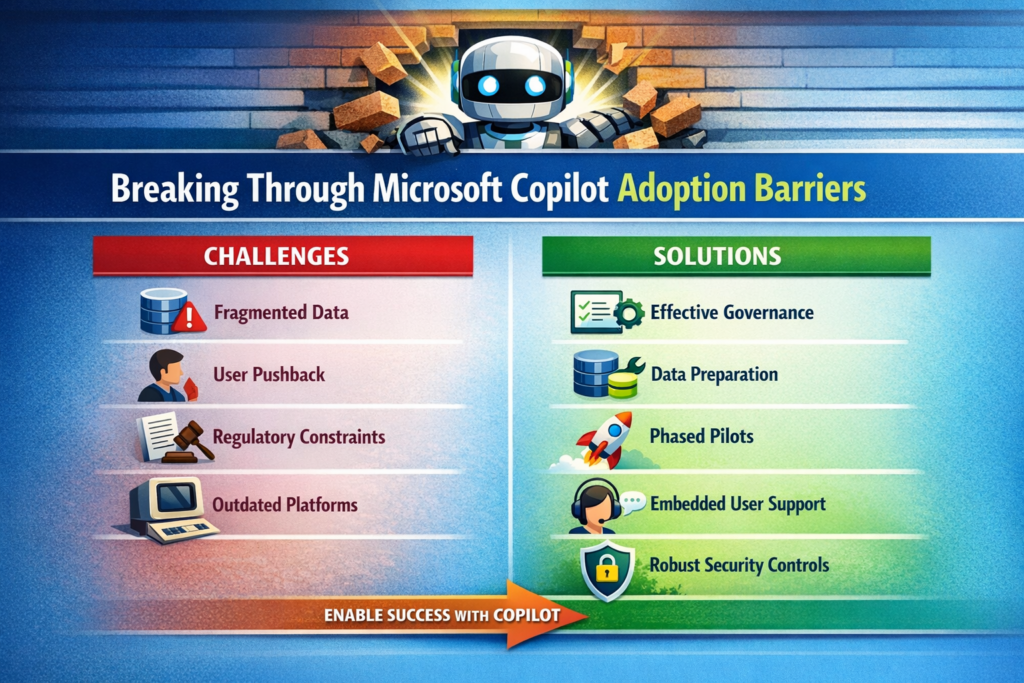
1. Data Hygiene and Permissions — The AI’s Diet

Copilot’s intelligence is only as good as the data you feed it. Disorganized SharePoint sites, inconsistent metadata and misaligned permissions will produce mediocre results and can expose sensitive information. Before rolling anything out, audit your content repositories and your Microsoft Entra ID configuration. If you still have an army of shared mailboxes or mysterious “Everyone” groups, fix those first.

Trade‑off: Cleaning up data and permissions isn’t glamorous or quick. It competes with feature development and sometimes uncovers political landmines. But skipping it means your AI assistant will look incompetent. You wouldn’t let a developer ship code before setting up version control; don’t expect an AI to deliver value without proper data plumbing.

2. Organizational Resistance — Not Everyone Loves Change

Users already suffer from change fatigue. Another tool promising to “transform productivity” can invite eye rolls. Leaders may also fear the unknown implications of AI on privacy and compliance. Communicate realistic benefits, involve legal and risk teams early, and tailor use cases to each department’s pain points. Don’t leave adoption to chance; treat it like any other major software rollout with change management built in.

Trade‑off: Over‑communicating can slow momentum, but silence breeds mistrust. Strike a balance by sharing concrete use cases—”we’re automating monthly financial summaries”—instead of vague promises.

3. Fragmented Systems — The API Problem

Copilot relies on Microsoft Graph connectors to pull data from third‑party platforms and on‑premises systems. If your CRM, HR and support systems aren’t connected, Copilot sees nothing. Technical teams need to establish integrations, configure Graph connectors and ensure indexing performance. Otherwise, the AI will provide incomplete answers or stall while waiting for data.

Trade‑off: Integration efforts take time and can reveal messy legacy dependencies. Resist the temptation to “pilot only in the Microsoft world.” Your users don’t live in one tool either; your AI shouldn’t.

4. Process and Governance Gaps — Who Owns This Thing?

Rolling out Copilot without defined ownership results in pockets of adoption and inconsistent configurations. Traditional one‑time training sessions don’t stick. Without continuous support, users revert to old habits. You need a central task force and an ongoing governance framework that includes IT, compliance, HR and business units. Set policies for role‑based access, monitor for AI misuse and create escalation paths.

Trade‑off: Governance can become bureaucratic if left unchecked. Keep it lightweight and pragmatic—focus on guardrails, not endless committees.
A Pragmatic Framework That Works

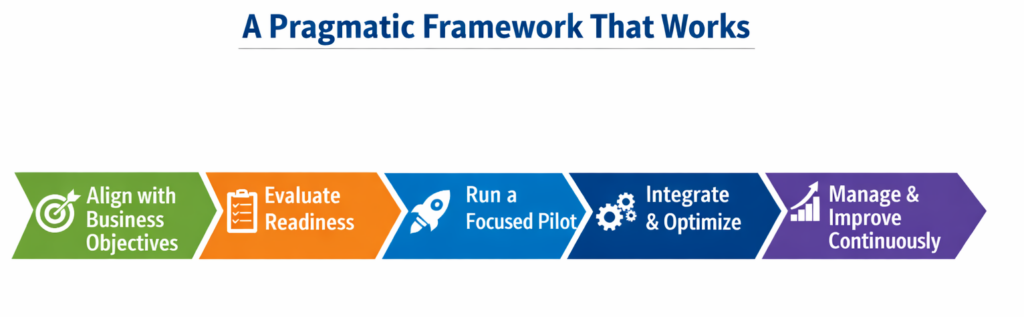
Step 1 — Align With Real Business Goals

Identify clear workflows where Copilot can generate measurable improvements: automating quarterly finance reports, drafting standardized contract clauses or summarizing customer support calls. Establish success metrics before rollout—reduced cycle times, fewer manual errors or higher employee satisfaction. Tie adoption to existing digital transformation initiatives rather than treating it as a side project.

Step 2 — Assess Enterprise Readiness

Run a technical audit of your Microsoft 365 tenant: content organization, permission hygiene, and Graph connector configuration. Parallel this with an organizational readiness assessment to gauge AI literacy and identify champions who will lead by example. If your environment isn’t ready, delay the rollout rather than risk a poor first impression.

Step 3 — Pilot, Don’t Boil the Ocean

Select pilot groups with well‑defined processes and clean data. Collect detailed feedback on user experience and productivity impacts. Use these insights to refine training materials and technical configurations. A phased rollout based on pilot results reduces risk and builds momentum.

Step 4 — Integrate and Optimize

Set up Graph connectors to integrate external systems like Salesforce or ServiceNow. Optimize indexing, search relevance and latency by monitoring Graph telemetry and tuning performance. Don’t treat performance tuning as an afterthought; delays and irrelevant results erode user trust faster than any licensing cost.

Step 5 — Invest in Continuous Change Management

One‑and‑done training doesn’t work. Provide in‑app, contextual guidance so users learn while they work. Build a champion network to share best practices and offer peer support. HR and training teams should create role‑specific AI literacy programs that address fears about job security and show how Copilot augments rather than replaces their work.

Step 6 — Measure and Iterate

Define key performance indicators beyond license activation: track actual usage, time saved on tasks, and user satisfaction. Establish a baseline before adoption, then compare post‑rollout metrics to quantify improvements. Use analytics to find underutilized features and adjust training or workflows accordingly. Continuous measurement and feedback loops turn adoption into an evolving practice rather than a one‑time event.

What I’ve Learned From the Trenches

  • Data quality is non‑negotiable. You can’t “train the AI harder” to fix poor metadata or broken permission models. Invest early in cleaning up your SharePoint and Teams structures.
  • Licensing is an operational, not just financial decision. Copilot is an add‑on to Microsoft 365 E3/E5. Start with pilot groups and plan for scaling costs, including support and training.
  • Don’t underestimate performance tuning. Large tenants with millions of documents will encounter search latency and ranking issues. Monitoring Graph telemetry should be part of your daily operations.
  • AI adoption is a cultural change. IT can configure connectors and licenses, but without HR and change management leading the human side, adoption stalls.
  • Governance isn’t glamorous, but it’s essential. Set clear policies for AI usage, auditing and risk management early. It will keep regulators happy and executives calm when the first misuse incident occurs.

Recommendations

  • Appoint a cross‑functional adoption task force. Bring together IT, compliance, HR and business unit leaders to coordinate strategy and maintain accountability.
  • Prioritize high‑value use cases for pilots. Start where data is clean and business impact is obvious. Expand only after demonstrating clear wins.
  • Leverage in‑app training tools and champion networks. Continuous guidance and peer advocacy accelerate adoption more than any slide deck.
  • Treat performance metrics as first‑class citizens. Use telemetry from the Microsoft 365 Admin Center and Graph usage dashboards to monitor adoption and refine configurations.
  • Plan licensing and support budgets holistically. Factor in the cost of training, change management and security monitoring alongside per‑user license fees.

Closing Takeaway

Rolling out Microsoft Copilot isn’t about pressing a button; it’s about engineering your environment—both technical and human—to harness AI effectively. Adopted thoughtfully, Copilot can free your teams from drudgery, accelerate decision‑making and spark innovation. Neglected, it becomes another underused line item on your cloud bill. Don’t settle for another half‑baked rollout. Address data readiness, design a measured adoption plan, and invest in continuous enablement. That’s how you turn generative AI from marketing hype into sustained productivity gains.

Thank you for stopping by. ✌️
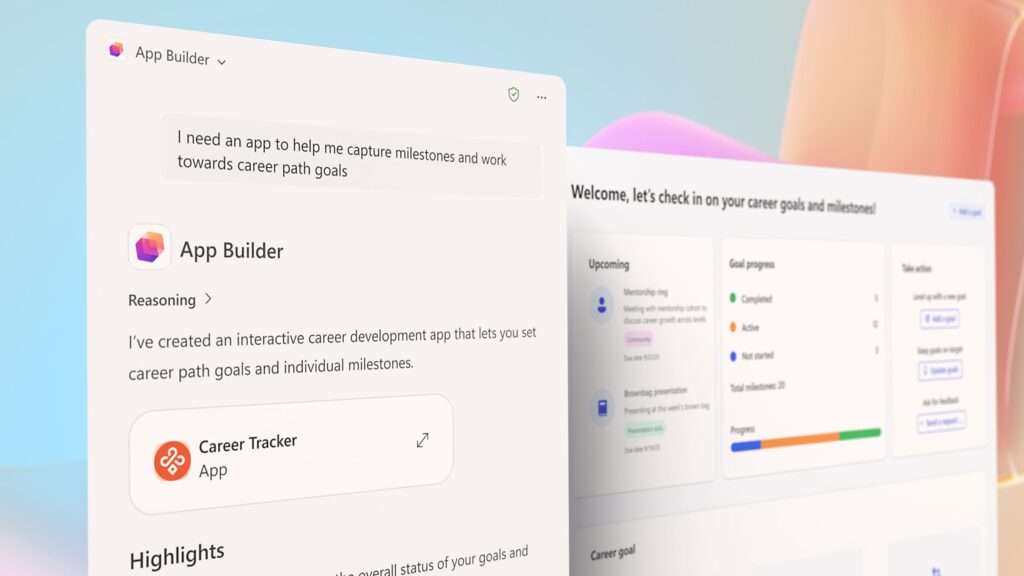
Microsoft 365 Copilot App Builder and Workflows: Turning “What If” Into “Done”

You know that feeling when you wish you could build an app or automate a task without summoning a developer, bribing them with coffee, or learning Power Automate yourself?
Well, Microsoft heard the collective sigh of the modern workforce and said, “Hold my cloud.”

Enter the newest duo in Microsoft 365 Copilot’s lineup, App Builder and Workflows, the AI-powered sidekicks that make “vibe coding” (yes, that’s now a thing) a workplace reality.


What’s the Big Idea?

Microsoft is leaning hard into natural language app creation, imagine chatting with your digital assistant and saying:

“Hey Copilot, build me an app that tracks our product launch tasks, assigns owners, and updates the dashboard weekly.”

And in a few conversational turns, boom!, it’s done.
No schema design. No Power Automate flow spaghetti. No weekend lost to trial-and-error.

These two new agents, App Builder and Workflows live inside the Microsoft 365 ecosystem, letting you build, automate, and connect your work life in Outlook, Teams, and SharePoint just by describing what you need.


Meet the Dynamic Duo

App Builder: Creating Functional Applications at Conversational Speed

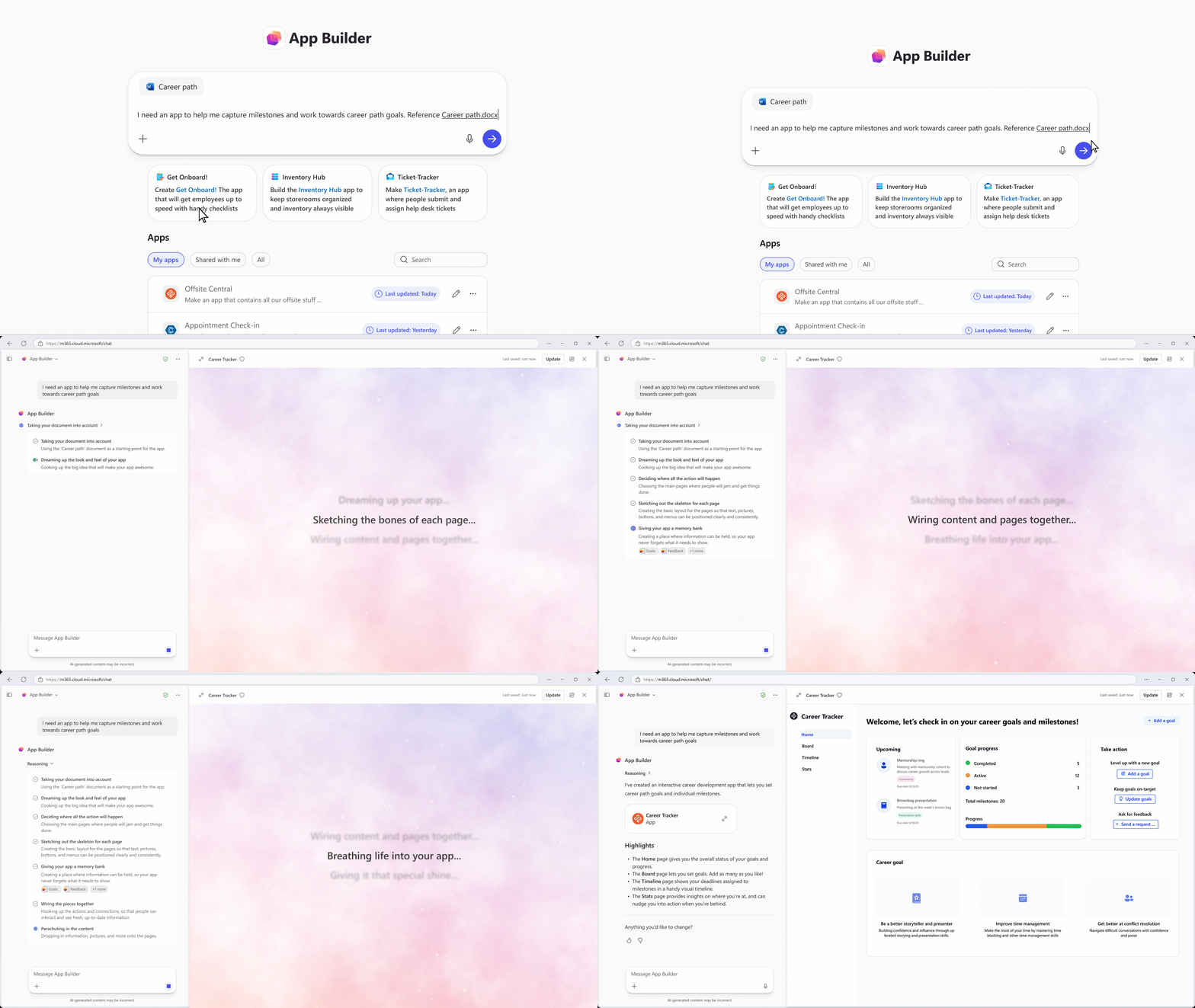
App Builder, Instead of writing requirements documents, creating data models, and waiting for sprint cycles, you can now describe an application’s purpose to Copilot, and it generates a working prototype in minutes.

What Can You Actually Build?

The possibilities are expansive. Imagine preparing for a product launch and needing dashboard-style tracking for launch milestones, task assignments, and campaign progress. With App Builder, you describe this scenario, and Copilot generates an interactive application complete with:

  • Dashboards and visualizations – charts, progress indicators, and real-time data displays
  • Data collection forms – lists, input fields, and structured data capture
  • Calculators and computational tools – custom logic without a single line of code
  • Interactive elements – anything your imagination can conjure up in a conversation

The magic? Your app is grounded in actual Microsoft 365 content – documents, spreadsheets, presentations, and OneNote files. It’s not abstract; it’s connected to your organizational data. Even more powerful, App Builder can generate and store new data using Microsoft Lists as a backend, giving you a proper database foundation without the traditional database setup headaches.

The Development Workflow is Deceptively Simple

Here’s where this becomes useful for those of us who’ve managed enterprise deployments: the development loop is instantaneous.

  1. Describe what you need in natural language through Copilot’s chat interface
  2. Preview your application directly within Copilot without leaving the chat
  3. Refine iteratively based on feedback – add fields, adjust visualizations, modify logic
  4. Deploy at conversational speed – each edit happens in the same conversation, making refinement effortless

Sharing? It’s trivial. Generate a link and distribute it exactly like you would a document. No complicated deployment processes, no provisioning requests, no waiting for your infrastructure team to create Azure resources. It’s the democratization of app development we’ve been theoretically discussing for the past five years, now actualized.

The Backend Reality Check

For those of us who’ve spent years wrestling with application architecture, here’s the beautiful part: App Builder abstracts complexity while maintaining enterprise integrity. The backend uses Microsoft Lists, which is infinitely more robust than Excel spreadsheets but infinitely simpler than building custom databases. It respects your organizational structure, permissions model, and data governance frameworks – not because it’s forced to, but because it’s natively integrated within the Microsoft 365 ecosystem.


Workflows: Your New Favorite Colleague That Never Forgets

Remember that one co-worker who keeps missing the Monday reminder email? Replace them (kindly) with Workflows, the Copilot agent that automates repetitive tasks across Outlook, Teams, SharePoint, and Planner.

Describing Automation, Not Coding It

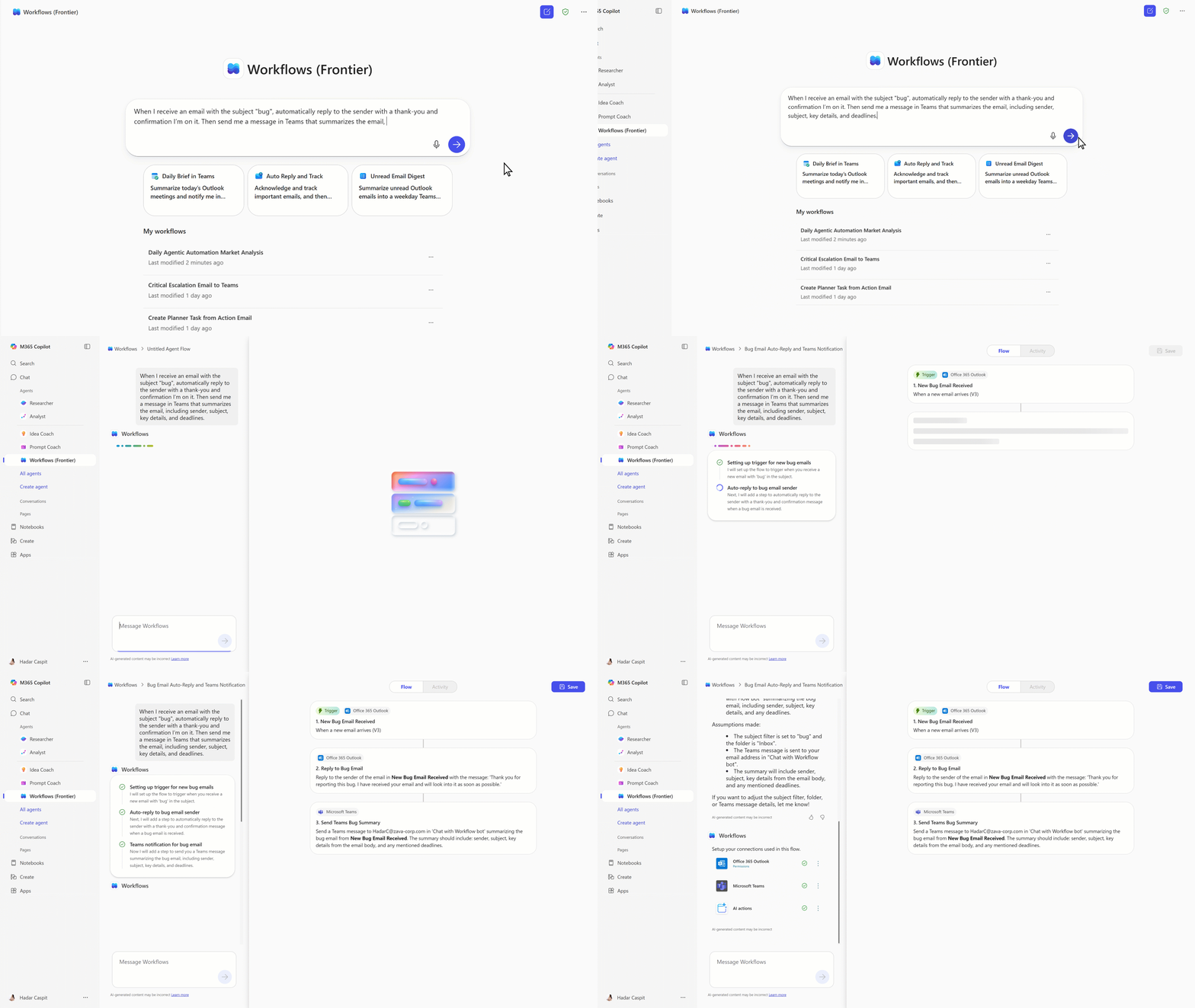
The Workflows agent converts natural language descriptions into automated processes across your entire M365 ecosystem. Imagine you want to:

  • Send recurring team updates – describe it to Copilot, and it generates a flow that sends Teams messages every Monday with upcoming deadlines and priority tasks from Planner
  • Post approval reminders – describe the requirement, and Copilot creates workflow logic that posts reminders in Teams channels
  • Manage calendar automation – handle scheduling, time zone conversions, and conflict management without writing integration code
  • Email orchestration – send triggered emails based on conditions you describe conversationally

The workflow visualization happens in real-time as Copilot builds your automation. You see each step as it’s created, understand the logic flow, and can request modifications mid-conversation. Want to add another condition? Describe it. Need to adjust a trigger? Say it out loud (well, type it). The conversation remains context-aware, allowing iterative refinement without starting over.

Enterprise-Grade Reliability with End-User Simplicity

Here’s the strategic genius: Workflows is optimized for end-user simplicity but built on the same enterprise infrastructure that powers Agent Flows in the full Copilot Studio experience. This isn’t a toy framework; it’s production-ready automation infrastructure made accessible through conversational interfaces.

For those of us managing enterprise deployments, this means:

  • Consistent reliability – same backend as enterprise solutions
  • Scalability – handles organizational-scale automation without degradation
  • Supportability – integration with existing support structures and monitoring systems
  • Governance – compliant with organizational policies and audit requirements

Your IT department won’t wake up at 3 AM because the Workflow agent created an automation that broke the email system. It’s designed to function reliably at scale.


And Then There’s Copilot Studio…

If App Builder and Workflows are your starter Pokémon, Copilot Studio is your evolved form. While App Builder and Workflows handle individual productivity, Copilot Studio serves as the gateway to enterprise-scale agent deployment.

It lets you build personalized, work-grounded agents that can fetch data from SharePoint, meeting transcripts, chats, or even external systems like Jira and ServiceNow.
You can start simple, “Build an agent that answers product launch FAQs” and later scale it into a fully governed, enterprise-wide digital assistant.


Security and Governance: Because AI Still Needs Adult Supervision

Microsoft didn’t forget the admins (bless them).
Everything built with App Builder and Workflows respects your existing permissions, roles, and compliance policies.

Management is streamlined through the Microsoft 365 Admin Center’s agent inventory section. Instead of one-by-one guardrails for each application or automation, admins can:

  • Manage group-level access – approve which departments can use App Builder or Workflows
  • Control agent creation and sharing – determine who can publish agents across the organization
  • Monitor activity – visibility into what agents are being built and how they’re distributed
  • Enforce compliance – ensure all agent activity aligns with organizational policies

This addresses the concern every IT leader has about democratized development: “Won’t everyone build chaotic, unsupported applications?” With App Builder and Workflows, the answer is “Not if you don’t want them to” – because governance is enforced systematically, not through hope and prayer.

Admins can manage all these conversational AI tools right from the Microsoft 365 admin center, with unified visibility and granular control. That means no more rogue automations or apps accidentally emailing the entire company (we’ve all been there).


Who Gets to Play? Join the Frontier Program

These features are currently rolling out under the Microsoft 365 Frontier Program, Microsoft’s early-access sandbox for bleeding-edge AI features.
It’s like being a beta tester, but with less risk of your PC catching fire.

The Frontier program serves another purpose beyond technical access: it creates feedback loops. Microsoft collects real-world usage patterns, identifies edge cases, and refines the platform based on actual deployment experiences. Early access participants are shaping the future of these tools which is either exciting or terrifying depending on your perspective.

Want in?
Submit that IT ticket. Be nice to your IT folks. Maybe throw in the brownie offer. They’ll appreciate it, and you’ll get access to tools that genuinely reshape what’s possible in your organization.


The Bottom Line

We’re at an inflection point. Ten years ago, suggesting that non-technical employees could build business applications was theoretical. Five years ago, it was aspirational. Today, it’s genuinely achievable through Microsoft 365 Copilot’s App Builder and Workflows agents.

This doesn’t eliminate the need for IT professionals – quite the contrary. Enterprise architects, security engineers, and integration specialists will be more valuable as organizational development velocity increases. The role changes from “gatekeeper of development” to “enabler of development at scale.” The skill set evolves from hand-coding solutions to designing governance frameworks, establishing architectural patterns, and managing organizational complexity.

Reality Check: It’s Still Early Days

Now, despite all the buzzwords and Microsoft’s glossy demos, App Builder and Workflows still have their fair share of quirks. I’ve tried both, and while I did eventually get a workflow up and running, it took a few rounds of stubborn persistence, a bit of patience, and maybe some caffeine-powered optimism.

The concept is brilliant, Microsoft has already proven that low-code/no-code works with Power Apps but perfecting this new, conversational layer will take time. It’s one thing for Copilot to understand “build me an app to track product launches,” and another for it to build exactly what you pictured in your head without losing context halfway through the conversation.

That said, this is absolutely a step in the right direction. In a world where IT teams are stretched thinner than an overused OneNote license, not everyone should have to learn Python just to automate a weekly task. Tools like these empower business users to take initiative without waiting weeks for development queues or change approvals.

So yes, App Builder and Workflows aren’t flawless yet, but they’re a promising start toward a workplace where “I wish this was automated” turns into “done! built it over lunch.”

Microsoft 365 Copilot’s App Builder and Workflows are a leap toward a world where anyone, not just developers can build digital solutions that actually get work done.

  • App Builder turns ideas into working apps.
  • Workflows automates the boring stuff.
  • Copilot Studio takes it all enterprise-scale.

Together, they’re redefining what “low-code” really means more like no-code-but-still-looks-like-magic.

Thank you for stopping by. ✌️

Source: Microsoft 365 Copilot now enables you to build apps and workflows