April 2026 Microsoft 365 Updates: Retirements, New Features & Security Enhancements

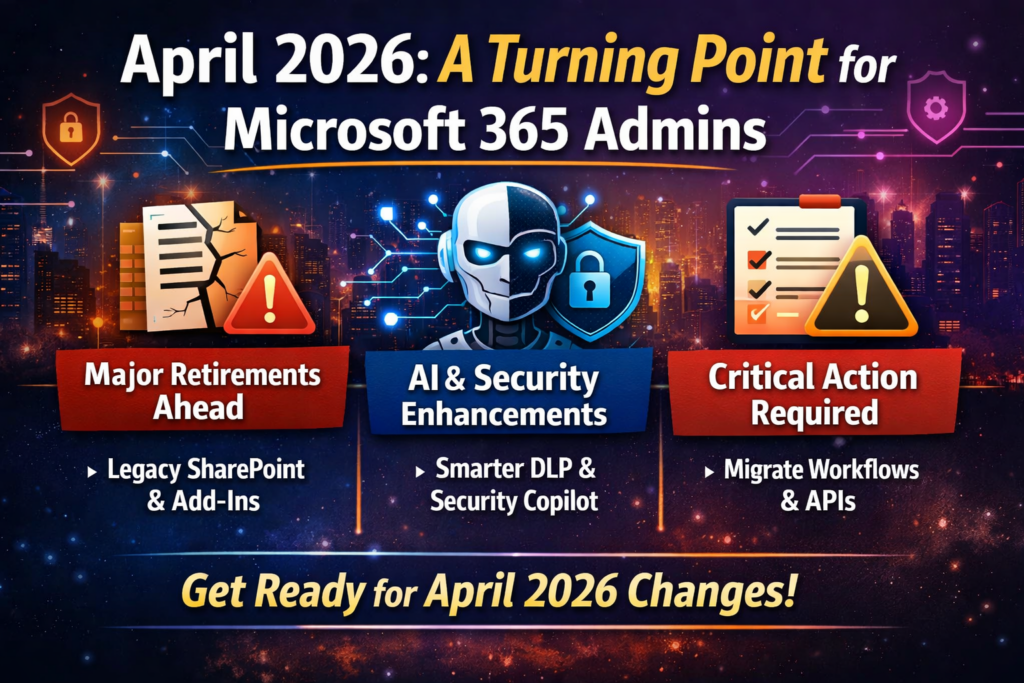
April 2026 is one of those months where Microsoft isn’t just shipping features—it’s forcing modernization.

We’re seeing a hard cutoff of legacy SharePoint components, deeper AI integration across security and compliance, and continued movement toward passwordless identity, cross-tenant collaboration, and centralized governance.

If you’re responsible for SharePoint, Teams, Purview, Entra ID, Defender, or Exchange, this is a month where ignoring Message Center updates will come back to bite you.

Let’s break it all down.

April 2026 at a Glance

CategoryCount
🔻 Retirements7
🆕 New Features14
🔧 Enhancements6
🔄 Functionality Changes5
⚠️ Action Required4

Retirements: What’s Going Away

April is heavily focused on SharePoint legacy cleanup—this is Microsoft drawing a hard line between classic vs modern.


SharePoint Legacy Information Management Features

April 2026

Microsoft is retiring:

  • Information Management Policies
  • In-Place Records Management
  • Deletion-only policies

These will no longer be accessible via UI or APIs.

What to do: Move to Microsoft Purview Data Lifecycle Management & Records Management

🔗 https://admin.cloud.microsoft/?#/MessageCenter/:/messages/MC1211579


SharePoint 2013 Workflows

April 2, 2026

No extensions. No exceptions. Fully retired.

What to do: Migrate to Power Automate

🔗 https://admin.microsoft.com/?ref=MessageCenter/:/messages/MC542767


SharePoint Add-Ins

April 2, 2026

Add-ins will stop working entirely, even for existing tenants.

What to do:

  • Scan using Microsoft 365 Assessment Tool
  • Move to SharePoint Framework (SPFx)
  • Coordinate with vendors

🔗 https://admin.microsoft.com/?ref=MessageCenter/:/messages/MC693865


Azure ACS (Access Control Service)

April 2, 2026

Any SharePoint app using ACS authentication will break.

What to do: Migrate to Microsoft Entra ID

🔗 https://learn.microsoft.com/en-us/sharepoint/dev/sp-add-ins/retirement-announcement-for-azure-acs


Domain-Isolated SPFx Web Parts

April 2, 2026

These will render errors post-retirement.

What to do: Convert to standard SPFx web parts

🔗 https://devblogs.microsoft.com/microsoft365dev/retiring-sharepoint-framework-domain-isolated-web-parts-for-sharepoint-online/


Semi-Annual Enterprise Channel (Unmanaged Devices)

April 6–11, 2026

  • No longer selectable for new installs
  • Existing devices continue—but can’t revert if changed

🔗 https://admin.cloud.microsoft/#/MessageCenter/:/messages/MC1249427


Viva Engage Live Events (Teams Live Events)

April 15, 2026

No new events can be scheduled.

What to do: Move to Teams Town Halls

🔗 https://admin.cloud.microsoft/?#/MessageCenter/:/messages/MC1227085


New Features: Worth the Hype

April isn’t just cleanup—it’s also serious capability expansion, especially around AI, identity, and cross-tenant scenarios.


Rule-Based App Management in Teams

Control third-party apps using:

  • Publisher metadata
  • Permission scopes
  • Org-wide rules

🔗 https://admin.cloud.microsoft/?#/MessageCenter/:/messages/MC1085133


Teams Express Voice Enrollment

Users can register voice profiles during meetings.

Enables:

  • Voice isolation
  • Speaker recognition
  • Copilot meeting insights

🔗 https://admin.cloud.microsoft/?#/MessageCenter/:/messages/MC1197146


Multiple Phone Numbers per User (Teams Phone)

Up to 10 numbers per user.

Huge for:

  • Contact centers
  • Multi-region users
  • Exec assistants

🔗 https://admin.cloud.microsoft/#/MessageCenter/:/messages/MC1253752


Passkeys in Entra Registration Campaigns

Admins can now push passkey enrollment instead of Authenticator.

Microsoft may auto-switch tenants to passkeys when ready.

🔗 https://admin.cloud.microsoft/?#/MessageCenter/:/messages/MC1253746


Cross-Tenant Intune MAM in Edge

Protect corporate data without device enrollment.

Perfect for:

  • Contractors
  • Mergers
  • Partner access

🔗 https://admin.cloud.microsoft/#/MessageCenter/:/messages/MC1255405


AI-Powered DLP Alert Summaries (Defender XDR)

Purview Triage Agent now:

  • Summarizes alerts
  • Categorizes risk
  • Speeds investigations

🔗 https://www.microsoft.com/en-US/microsoft-365/roadmap?searchterms=558860


Endpoint DLP Device Health Dashboard

Monitor:

  • Device connectivity
  • Policy readiness
  • Compliance gaps

🔗 https://www.microsoft.com/en-in/microsoft-365/roadmap?id=559267


Teams Protection Reports

Admins can review:

  • Suspicious messages
  • Suspicious calls
  • User-reported threats

🔗 https://admin.cloud.microsoft/?#/MessageCenter/:/messages/MC1227625


Advanced Auto-Labeling in Purview

New capabilities:

  • Override manual labels
  • Automatically remove outdated labels

🔗 https://admin.cloud.microsoft/#/MessageCenter/:/messages/MC1249431


Security Copilot Included in M365 E5

Big one.

  • 400 SCUs per 1,000 users
  • Integrated across Defender, Entra, Purview
  • Supports custom agents

🔗 https://admin.cloud.microsoft/?#/MessageCenter/:/messages/MC1261596


OneDrive Offboarding Improvements

Admins now get:

  • Better visibility
  • Bulk transfer tools
  • “Move and keep sharing”

🔗 https://admin.cloud.microsoft/?#/MessageCenter/:/messages/MC1164381


New SharePoint Experience (AI-Powered)

Includes:

  • Discover / Publish / Build navigation
  • Copilot integration
  • Improved UX

🔗 https://admin.cloud.microsoft/?#/MessageCenter/:/messages/MC1240699


Enhancements


Teams & Places Licensing Expansion

More features now included in core licenses:

  • Town halls (up to 3,000 attendees)
  • Places Finder
  • Space analytics

🔗 https://techcommunity.microsoft.com/blog/microsoftteamsblog/licensing-updates-extend-access-to-advanced-capabilities-in-microsoft-teams-and-/4488312


PAYG for AI Risk Detection (Purview)

AI-related IRM indicators now billed via Azure subscription (PAYG).

🔗 https://admin.cloud.microsoft/#/MessageCenter/:/messages/MC1242784


Authenticator Jailbreak Detection

Credentials wiped automatically on compromised devices.

🔗 https://admin.cloud.microsoft/?#/MessageCenter/:/messages/MC1179154


Triage Agent Enhancements

Now supports:

  • Metadata-based rules
  • Non-content alerts
  • Dedicated agent identity

🔗 https://www.microsoft.com/en-in/microsoft-365/roadmap?id=557552


Advanced Label Targeting

Supports:

  • Dynamic groups
  • Non-mail-enabled groups
  • Exclusions

🔗 https://www.microsoft.com/en-in/microsoft-365/roadmap?id=558685


Cross-Tenant Group Sync

Security groups can now sync across tenants.

🔗 https://admin.cloud.microsoft/?#/MessageCenter/:/messages/MC1198077


Existing Functionality Changes


Teams Device Management → Pro Management Portal

Device management is moving out of TAC.

🔗 https://admin.cloud.microsoft/?#/MessageCenter/:/messages/MC1227622


Custom OneDrive Sync Folder Names

Admins can shorten folder names to avoid path limits.

🔗 https://www.microsoft.com/en-in/microsoft-365/roadmap?id=557562


Always-On Endpoint DLP Diagnostics

Enabled by default.

Improves troubleshooting but increases visibility requirements.

🔗 https://admin.cloud.microsoft/#/MessageCenter/:/messages/MC1246001


eDiscovery Review Sets Increased

From 20 → 100 per case

🔗 https://www.microsoft.com/en-in/microsoft-365/roadmap?id=558858


DLP Policy Tips & Email Notifications Decoupled

Finally—independent control.

🔗 https://admin.cloud.microsoft/?#/MessageCenter/:/messages/MC791114


Viva Engage Domain Migration

Final move from:

  • @yammer.com → @engage.mail.microsoft

🔗 https://admin.cloud.microsoft/#/MessageCenter/:/messages/MC1251200


Action Required

These are the ones you cannot ignore.


Message Trace API Retirement

April 8, 2026

👉 Move to Microsoft Graph API

🔗 https://admin.cloud.microsoft/?#/MessageCenter/:/messages/MC1221939


Outlook Usage Report Removed (EAC)

April 14, 2026

Use Microsoft 365 Admin Center reports instead

🔗 https://admin.cloud.microsoft/?#/MessageCenter/:/messages/MC1230889


Teams Office 365 Connectors Retirement

April 30, 2026

Move to Workflows (webhooks)

🔗 https://devblogs.microsoft.com/microsoft365dev/retirement-of-office-365-connectors-within-microsoft-teams/


Defender iOS 16 Support Ends

April 30, 2026

Upgrade devices to iOS 17+

🔗 https://admin.cloud.microsoft/#/MessageCenter/:/messages/MC1245219


Final Thoughts

April 2026 sends a very clear message:

Legacy is no longer tolerated. AI + Security + Governance is the future.

Your priorities this month:

✔ Migrate SharePoint legacy components
✔ Review authentication (passkeys, ACS removal)
✔ Update automation (Graph API shift)
✔ Prepare for AI-driven security workflows
✔ Clean up Teams integrations (connectors, devices)

Because in Microsoft 365 today…

If you don’t modernize proactively, Microsoft will do it for you—on their timeline.

Thank you for stopping by. ✌️

Microsoft 365 Admins: What’s Changing in March 2026 — Key Updates, Retirements & Security Enhancements

March 2026 is another big month of change across Microsoft 365. Microsoft continues tightening security, modernizing collaboration experiences, and expanding AI-driven governance capabilities across the platform.

For Microsoft 365 administrators, this month brings a mix of retirements, new features, compliance enhancements, and several important action items that could impact authentication, Teams deployments, Conditional Access policies, and SharePoint resources.

If you manage Teams, SharePoint, Purview, Defender, Entra ID, or Exchange, now is the time to review what’s changing.

Let’s break down the most important updates.


Table of Contents

March 2026 At a Glance

CategoryCount
Retirements8
New Features13
Enhancements5
Functionality Changes4
Action Required6

Retirements: What’s Going Away

Several long-standing features across Outlook, SharePoint, Viva Engage, and security tooling are being retired this month.

Personal Account Integration in Outlook Web App

Users will no longer be able to connect personal email accounts or calendars inside Outlook Web App (OWA).

Existing linked personal accounts will automatically disconnect.

➡️ Recommendation: Users who need multi-account access should switch to Outlook desktop or manage accounts separately.

Reference:
https://admin.cloud.microsoft/?#/MessageCenter/:/messages/MC1226749


Web Image Search in SharePoint Pages

The Web Search image pivot used to insert Bing images into SharePoint pages is being removed due to the retirement of the Bing Search API.

Content creators can still insert images using:

  • Stock images
  • Uploaded files
  • Site assets
  • Tenant assets

Reference:
https://admin.cloud.microsoft/?#/MessageCenter/:/messages/MC1230452


Featured Links on SharePoint Start Page

The Featured Links capability on the SharePoint start page is being retired.

Admins should use alternatives such as:

  • Global navigation
  • Viva Connections dashboards
  • SharePoint navigation elements

Reference:
https://admin.cloud.microsoft/?#/MessageCenter/:/messages/MC1197131


Viva Engage Legacy Export Options

Legacy export options in the Viva Engage admin center are being removed:

  • Include attachments
  • Include external networks

Admins can still retrieve exports via SharePoint download links.

Reference:
https://admin.cloud.microsoft/?#/MessageCenter/:/messages/MC1230453


Microsoft Rewards Azure AD Linking

Users will no longer be able to link work accounts to Microsoft Rewards.

Existing reward balances remain unaffected.

Reference:
https://admin.cloud.microsoft/?#/MessageCenter/:/messages/MC1234567


Defender for Android Personal Profile Protection

Microsoft Defender for Android will stop protecting personal profiles on MDM-managed devices, focusing solely on work profiles.

Reference:
https://admin.cloud.microsoft/?#/MessageCenter/:/messages/MC1221927


External Tokens for Actionable Messages

External access tokens used by Actionable Messages will be retired.

Organizations must transition to Microsoft Entra authentication.

Reference:
https://admin.cloud.microsoft/?#/MessageCenter/:/messages/MC1189663


Outlook Contact Masking

The Contact Masking feature that hid suggested recipients will be removed.

Admins may want to review:

  • Address Book Policies
  • GAL visibility settings
  • Information Barriers

Reference:
https://admin.cloud.microsoft/?#/MessageCenter/:/messages/MC1234566


New Features: Worth the Hype

March introduces several major capabilities spanning SharePoint security, Teams protection, Exchange scalability, and Purview governance.


SharePoint Content Security Policy Enforcement

SharePoint is enforcing Content Security Policy (CSP) to control which scripts, styles, and resources pages can load.

This dramatically improves protection against:

  • Cross-site scripting (XSS)
  • Code injection attacks
  • Clickjacking

Reference:
https://techcommunity.microsoft.com/blog/spblog/sharepoint-online-content-security-policy-csp-enforcement-dates-and-guidance/4472662


Defender for Office 365 URL Click Alerts in Teams

Microsoft Defender now detects malicious link clicks inside Teams messages, not just email.

Security teams will see alerts like:

  • User clicked potentially malicious URL
  • Suspicious link activity detected

Reference:
https://www.microsoft.com/microsoft-365/roadmap?searchterms=557549


New SharePoint Experience with AI

Microsoft is rolling out a redesigned SharePoint interface with AI-assisted capabilities.

New navigation includes:

  • Discover
  • Publish
  • Build
  • OneDrive
  • Home

This experience enters public preview in March.

Reference:
https://admin.cloud.microsoft/?#/MessageCenter/:/messages/MC1240699


Conditional Access for Account Recovery

Microsoft Entra introduces secure account recovery workflows protected by Conditional Access.

Users can regain access when authentication methods are unavailable.

Reference:
https://www.microsoft.com/microsoft-365/roadmap?id=529855


High Volume Email (HVE) Now Generally Available

Exchange Online now supports High Volume Email (HVE) for sending internal system notifications and alerts without impacting normal mail flow.

Reference:
https://techcommunity.microsoft.com/blog/exchange/high-volume-email-continued-support-for-basic-authentication–other-important-up/4411197


DLP Rule Action to Trigger Power Automate

Microsoft Purview DLP policies can now trigger Power Automate workflows when violations occur.

Reference:
https://www.microsoft.com/microsoft-365/roadmap?id=380721


File-Level Archiving in Microsoft 365 Archive

Admins will soon be able to archive individual SharePoint files, providing more granular storage lifecycle control.

Reference:
https://www.microsoft.com/microsoft-365/roadmap?id=477371


Information Barriers v2

Information Barriers v2 introduces major improvements:

  • Up to 5,000 segments
  • Users in 10 segments simultaneously
  • Improved discoverability

Reference:
https://www.microsoft.com/microsoft-365/roadmap?id=402516


Passkey Profiles in Microsoft Entra

Microsoft Entra will support passkey profiles and synced passkeys for better passwordless authentication management.

Reference:
https://admin.cloud.microsoft/?#/MessageCenter/:/messages/MC1221452


Protection Reports in Teams Admin Center

Admins will now see user-reported suspicious messages and calls through new protection reports.

Reference:
https://admin.cloud.microsoft/?#/MessageCenter/:/messages/MC1227625


SharePoint Branding Governance via PowerShell

Admins can centrally manage SharePoint branding including:

  • Themes
  • Custom branding permissions
  • Branding audits

Reference:
https://admin.cloud.microsoft/?#/MessageCenter/:/messages/MC1186372


Data Security Posture Agent in Purview

Purview introduces an AI-powered agent that continuously analyzes content to identify sensitive data risks.

Reference:
https://admin.cloud.microsoft/?#/MessageCenter/:/messages/MC1217155


Expanded DLP Enforcement for Microsoft 365 Copilot

DLP policies will now block Copilot from processing protected files across all storage locations.

Reference:
https://admin.cloud.microsoft/?#/MessageCenter/:/messages/MC1234661


Enhancements

Several improvements focus on security visibility and communications management.

Teams Event Registration Policy

Admins can control whether event registration is allowed via Teams Events policies.

Reference:
https://admin.cloud.microsoft/?#/MessageCenter/:/messages/MC1226497


Defender Antivirus Registry Changes

Antivirus exclusions will no longer appear in the local registry for devices managed through Defender.

Reference:
https://admin.cloud.microsoft/?#/MessageCenter/:/messages/MC1227621


Organizational Messages for Hybrid Devices

Tenant messaging now supports Entra hybrid-joined endpoints.

Reference:
https://www.microsoft.com/microsoft-365/roadmap?searchterms=503564


Organizational Messages via Email

Admins can deliver tenant-wide notifications via email.

Reference:
https://www.microsoft.com/microsoft-365/roadmap?searchterms=503562


DLP Protection for Microsoft 365 Copilot

Purview DLP policies now extend to Copilot prompts and responses.

Reference:
https://www.microsoft.com/microsoft-365/roadmap?searchterms=515945


Existing Functionality Changes

Teams Call Quality Dashboard Meeting ID Change

Existing CQD queries using Meeting ID must be updated.

Reference:
https://admin.cloud.microsoft/?#/MessageCenter/:/messages/MC1228315


Conditional Access Policy Enforcement Improvements

Resource exclusions in Conditional Access policies will now be consistently enforced.

Reference:
https://techcommunity.microsoft.com/blog/microsoft-entra-blog/upcoming-conditional-access-change-improved-enforcement-for-policies-with-resour/4488925


Guest Governance Access Reviews Require Azure Subscription

Guest governance and access reviews now require a linked Azure subscription.

Reference:
https://admin.cloud.microsoft/?#/MessageCenter/:/messages/MC1225192


Decoupled DLP Policy Tips & Email Notifications

Admins can now configure policy tips and notifications independently.

Reference:
https://admin.cloud.microsoft/?#/MessageCenter/:/messages/MC791114


Action Required

These changes require immediate administrative planning.


Teams App Retirement in Amazon Appstore

Organizations should move users to the Teams Android app or web client.

Reference:
https://admin.cloud.microsoft/?#/MessageCenter/:/messages/MC1234560


Context IQ Retirement in Outlook

The / quick-insert feature for attachments is being removed.

Reference:
https://admin.cloud.microsoft/?#/MessageCenter/:/messages/MC1230455


Defender Identity Theft Classic Alert Retirement

Automation workflows referencing classic alerts must be updated.

Reference:
https://admin.cloud.microsoft/?#/MessageCenter/:/messages/MC1234542


Conditional Access Control Deprecation

The Require approved client app control will be retired.

Use Require app protection policy instead.

Reference:
https://techcommunity.microsoft.com/t5/microsoft-entra-azure-ad-blog/microsoft-entra-change-announcements-march-2023-train/ba-p/2967448


SharePoint CDN Domain Retirement

The legacy CDN domain is being replaced.

Old

publiccdn.sharepointonline.com

New

public-cdn.sharepointonline.com

Reference:
https://admin.cloud.microsoft/#/MessageCenter/:/messages/MC1184996


Android Version Requirement for Defender

Microsoft Defender for Android will require Android 11 or later.

Action Required: Advise users to upgrade their devices to Android 11.0 or later.

Reference: https://admin.cloud.microsoft/?#/MessageCenter/:/messages/MC1222977


Final Thoughts

March 2026 reflects Microsoft’s ongoing strategy:

Modernize security. Strengthen identity. Expand AI governance. Simplify collaboration.

For administrators, the key priorities this month should be:

  • Reviewing Conditional Access policies
  • Updating SharePoint CDN references
  • Preparing for Copilot-related DLP changes
  • Monitoring new Teams security alerts
  • Updating automation workflows

As always, staying ahead of these changes will help ensure security posture, compliance, and user experience remain intact.

Microsoft 365 Admins: February 2026 Brings Major Retirements, New Admin Controls & Security-First Changes — Here’s Your Definitive Guide

February 2026 is shaping up to be a high-impact month for Microsoft 365 administrators. Microsoft continues its push toward a security-first, Copilot-governed, and centrally managed tenant model, while retiring legacy features that no longer align with modern M365 architecture.

If you manage Planner, Teams, Purview, Entra ID, Defender, or Exchange Online, this is a month where proactive planning matters. Below is a clear, admin-focused breakdown of what’s retiring, what’s new, what’s changing, and what requires action, with direct reference links so you can validate and prepare.


📊 February 2026 at a Glance

CategoryCount
🔻 Retirements4
🆕 New Features12
🔧 Enhancements6
🔄 Functionality Changes6
⚠️ Action Required2

🔻 Retirements: What’s Going Away

Microsoft continues consolidating overlapping experiences in favor of fewer, more powerful platforms.

  • Microsoft Planner – Legacy Features (Mid-February 2026)
    Retiring:
    • Legacy task comments
    • Planner in Loop pages
    • Viva Goals integration
    • iCalendar feeds
    • Whiteboard tab integration
    The new Planner experience and task chat fully replace these capabilities.
    🔗 Reference: https://admin.microsoft.com/#/MessageCenter/:/messages/MC1188824


🆕 New Features: Worth the Hype

February delivers real admin value, especially around Copilot governance, external collaboration, and Purview investigations.


🔧 Enhancements: Quiet but Powerful


🔄 Existing Functionality Changes


⚠️ Action Required: Don’t Ignore These


📌 Final Thoughts

February 2026 sends a clear message from Microsoft:

Centralize security. Govern Copilot. Simplify collaboration. Retire legacy features.

Admins who prepare early updating Purview DLP, reviewing Teams external access, auditing mobile devices, and modernizing Planner workflows, will avoid disruption and last-minute fire drills.

Thank you for stopping by. ✌️

No, Turning On Copilot Isn’t Enough: Real Strategies for AI Adoption

Ever had that sinking feeling when a flashy tool turns out to be another “check the box” initiative? You excitedly switch on Microsoft Copilot and expect your teams to magically start automating reports, summarizing meetings and debugging spreadsheets. A few weeks later, adoption stalls, users complain that the AI gives them weird answers, and someone in legal hits the panic button about data exposure. Sound familiar? Welcome to the challenge of adopting AI-powered assistants inside real enterprises.

Context: AI Has Entered the Core Stack—Now What?

Unlike the chatbots of years past, Copilot doesn’t live off to the side—it sits inside Word, Excel, Outlook, Teams and Dynamics, querying your organization’s calendars, emails and documents through Microsoft Graph. That means AI adoption is now less like installing a browser extension and more like rolling out a core enterprise platform. Success depends on aligning data policies, security models and workflows well before users ever see a prompt.

For technical leaders, this is a double‑edged sword. Do it right and you’ll unlock measurable gains by reducing repetitive work and surfacing insights faster. Do it wrong and you get cluttered search results, nervous compliance teams and wasted license spend. Copilot adoption isn’t about chasing shiny objects; it’s about engineering your environment so AI can do its job.

The Hard Stuff: Barriers You Actually Need to Care About

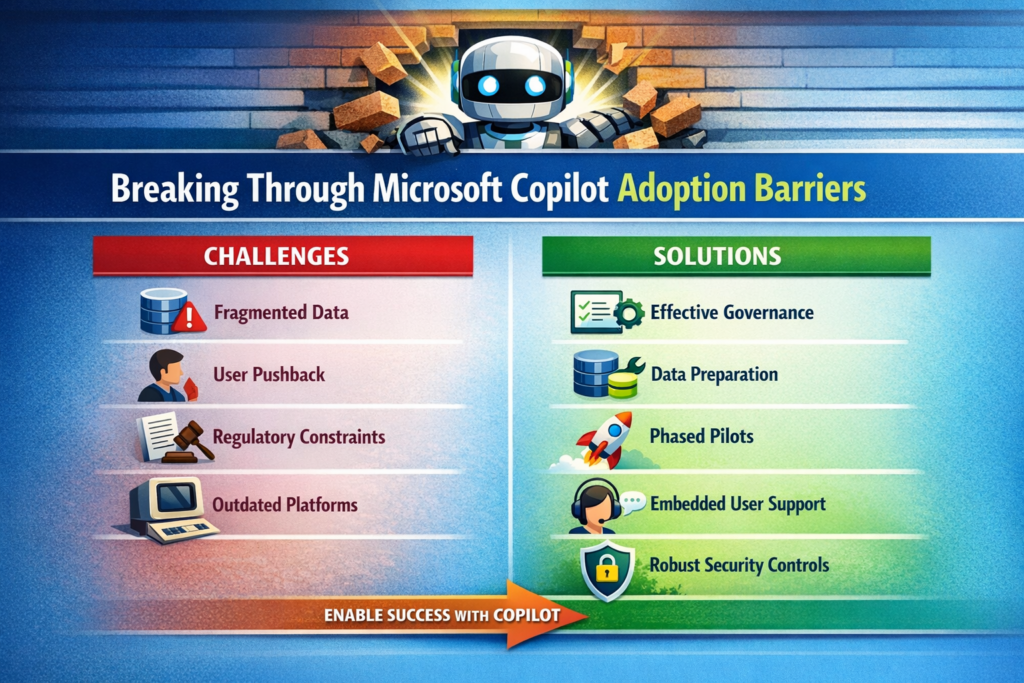
1. Data Hygiene and Permissions — The AI’s Diet

Copilot’s intelligence is only as good as the data you feed it. Disorganized SharePoint sites, inconsistent metadata and misaligned permissions will produce mediocre results and can expose sensitive information. Before rolling anything out, audit your content repositories and your Microsoft Entra ID configuration. If you still have an army of shared mailboxes or mysterious “Everyone” groups, fix those first.

Trade‑off: Cleaning up data and permissions isn’t glamorous or quick. It competes with feature development and sometimes uncovers political landmines. But skipping it means your AI assistant will look incompetent. You wouldn’t let a developer ship code before setting up version control; don’t expect an AI to deliver value without proper data plumbing.

2. Organizational Resistance — Not Everyone Loves Change

Users already suffer from change fatigue. Another tool promising to “transform productivity” can invite eye rolls. Leaders may also fear the unknown implications of AI on privacy and compliance. Communicate realistic benefits, involve legal and risk teams early, and tailor use cases to each department’s pain points. Don’t leave adoption to chance; treat it like any other major software rollout with change management built in.

Trade‑off: Over‑communicating can slow momentum, but silence breeds mistrust. Strike a balance by sharing concrete use cases—”we’re automating monthly financial summaries”—instead of vague promises.

3. Fragmented Systems — The API Problem

Copilot relies on Microsoft Graph connectors to pull data from third‑party platforms and on‑premises systems. If your CRM, HR and support systems aren’t connected, Copilot sees nothing. Technical teams need to establish integrations, configure Graph connectors and ensure indexing performance. Otherwise, the AI will provide incomplete answers or stall while waiting for data.

Trade‑off: Integration efforts take time and can reveal messy legacy dependencies. Resist the temptation to “pilot only in the Microsoft world.” Your users don’t live in one tool either; your AI shouldn’t.

4. Process and Governance Gaps — Who Owns This Thing?

Rolling out Copilot without defined ownership results in pockets of adoption and inconsistent configurations. Traditional one‑time training sessions don’t stick. Without continuous support, users revert to old habits. You need a central task force and an ongoing governance framework that includes IT, compliance, HR and business units. Set policies for role‑based access, monitor for AI misuse and create escalation paths.

Trade‑off: Governance can become bureaucratic if left unchecked. Keep it lightweight and pragmatic—focus on guardrails, not endless committees.

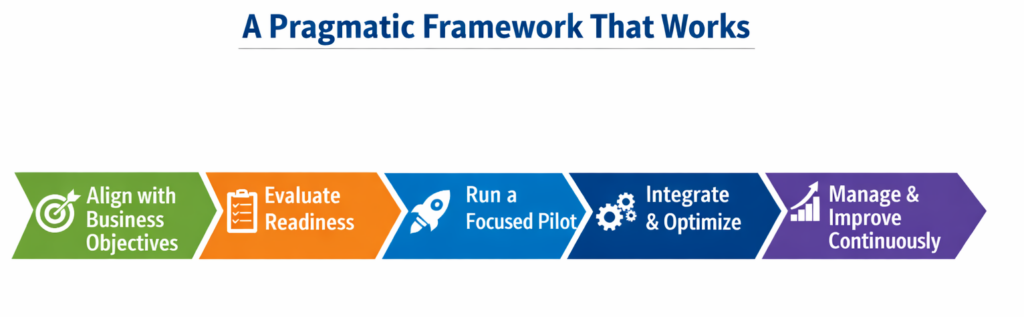
A Pragmatic Framework That Works

Step 1 — Align With Real Business Goals

Identify clear workflows where Copilot can generate measurable improvements: automating quarterly finance reports, drafting standardized contract clauses or summarizing customer support calls. Establish success metrics before rollout—reduced cycle times, fewer manual errors or higher employee satisfaction. Tie adoption to existing digital transformation initiatives rather than treating it as a side project.

Step 2 — Assess Enterprise Readiness

Run a technical audit of your Microsoft 365 tenant: content organization, permission hygiene, and Graph connector configuration. Parallel this with an organizational readiness assessment to gauge AI literacy and identify champions who will lead by example. If your environment isn’t ready, delay the rollout rather than risk a poor first impression.

Step 3 — Pilot, Don’t Boil the Ocean

Select pilot groups with well‑defined processes and clean data. Collect detailed feedback on user experience and productivity impacts. Use these insights to refine training materials and technical configurations. A phased rollout based on pilot results reduces risk and builds momentum.

Step 4 — Integrate and Optimize

Set up Graph connectors to integrate external systems like Salesforce or ServiceNow. Optimize indexing, search relevance and latency by monitoring Graph telemetry and tuning performance. Don’t treat performance tuning as an afterthought; delays and irrelevant results erode user trust faster than any licensing cost.

Step 5 — Invest in Continuous Change Management

One‑and‑done training doesn’t work. Provide in‑app, contextual guidance so users learn while they work. Build a champion network to share best practices and offer peer support. HR and training teams should create role‑specific AI literacy programs that address fears about job security and show how Copilot augments rather than replaces their work.

Step 6 — Measure and Iterate

Define key performance indicators beyond license activation: track actual usage, time saved on tasks, and user satisfaction. Establish a baseline before adoption, then compare post‑rollout metrics to quantify improvements. Use analytics to find underutilized features and adjust training or workflows accordingly. Continuous measurement and feedback loops turn adoption into an evolving practice rather than a one‑time event.

What I’ve Learned From the Trenches

  • Data quality is non‑negotiable. You can’t “train the AI harder” to fix poor metadata or broken permission models. Invest early in cleaning up your SharePoint and Teams structures.
  • Licensing is an operational, not just financial decision. Copilot is an add‑on to Microsoft 365 E3/E5. Start with pilot groups and plan for scaling costs, including support and training.
  • Don’t underestimate performance tuning. Large tenants with millions of documents will encounter search latency and ranking issues. Monitoring Graph telemetry should be part of your daily operations.
  • AI adoption is a cultural change. IT can configure connectors and licenses, but without HR and change management leading the human side, adoption stalls.
  • Governance isn’t glamorous, but it’s essential. Set clear policies for AI usage, auditing and risk management early. It will keep regulators happy and executives calm when the first misuse incident occurs.

Recommendations

  • Appoint a cross‑functional adoption task force. Bring together IT, compliance, HR and business unit leaders to coordinate strategy and maintain accountability.
  • Prioritize high‑value use cases for pilots. Start where data is clean and business impact is obvious. Expand only after demonstrating clear wins.
  • Leverage in‑app training tools and champion networks. Continuous guidance and peer advocacy accelerate adoption more than any slide deck.
  • Treat performance metrics as first‑class citizens. Use telemetry from the Microsoft 365 Admin Center and Graph usage dashboards to monitor adoption and refine configurations.
  • Plan licensing and support budgets holistically. Factor in the cost of training, change management and security monitoring alongside per‑user license fees.

Closing Takeaway

Rolling out Microsoft Copilot isn’t about pressing a button; it’s about engineering your environment—both technical and human—to harness AI effectively. Adopted thoughtfully, Copilot can free your teams from drudgery, accelerate decision‑making and spark innovation. Neglected, it becomes another underused line item on your cloud bill. Don’t settle for another half‑baked rollout. Address data readiness, design a measured adoption plan, and invest in continuous enablement. That’s how you turn generative AI from marketing hype into sustained productivity gains.

Thank you for stopping by. ✌️

Microsoft 365 Admins: December 2025 — Retirements, New Features & What IT Teams Need to Do Next

December is usually the month where admins brace for year-end freezes… but Microsoft apparently didn’t get the memo. This month’s wave of updates brings retirements, new capabilities, compliance upgrades, and several “fix this or something breaks” action items for enterprise tenants.

As 2025 comes to a close, Microsoft is rolling out a series of final updates that reinforce its focus on data governance, AI-powered productivity, and secure-by-default principles. With key feature retirements, new security protections in Teams, and compliance tools being supercharged, December is far from a quiet month for Microsoft 365 admins.

Whether you manage collaboration, security, data lifecycle, or compliance, this guide covers the critical retirements, new features, enhancements, and action items rolling out this month.


December at a Glance

CategoryCount
🔻 Retirements6
🆕 New Features12
🔧 Enhancements8
🔄 Functionality Changes3
⚠️ Action Required3

Retirements: Cleanup Season Arrives for Legacy Features

Favorite Contacts Retires in Microsoft Places

Early December marks the retirement of the Favorite Contacts experience in Microsoft Places, replaced with the more consistent Frequent Contacts model used across other apps. Admins also lose the related PowerShell control.

🔗 Learn more:
https://admin.cloud.microsoft/?#/MessageCenter/:/messages/MC1182693


App Skills Retired in Copilot for Excel

Microsoft is removing App Skills from Copilot for Excel and promoting Agent Mode as the new standard for in-workbook insights. Copilot Chat remains the recommended fallback.

🔗 Reference:
https://admin.cloud.microsoft/?#/MessageCenter/:/messages/MC1184407


TeamworkDevice (Beta) API Removed From Microsoft Graph

The TeamworkDevice (beta) Graph API will be retired on Dec 8, 2025. Device management now routes through the Teams Rooms Pro Management Portal.

🔗 Details:
https://admin.cloud.microsoft/?#/MessageCenter/:/messages/MC1183294


PowerPoint “Reuse Slides” Feature Retired

The well-loved Reuse Slides feature disappears from PowerPoint for Windows and Mac this month. Users must manually copy/paste slides after the removal.

🔗 Details:
https://admin.cloud.microsoft/?#/MessageCenter/:/messages/MC1179161


End of Support for Teams on Android 8

By late December, Microsoft will no longer provide security patches or bug fixes for Teams on Android 8 devices.

🔗 More info:
http://admin.cloud.microsoft/?#/MessageCenter/:/messages/MC1181212


Assignments & Courses ACEs Retired in Viva Connections/SharePoint

Education tenants should prepare for the retirement of Assignments and Courses ACEs on Dec 31, 2025, with end of support coming June 30, 2026.

🔗 Announcement:
https://admin.cloud.microsoft/?#/MessageCenter/:/messages/MC1184647


New Features: High-Impact Enhancements You’ll Want to Enable

Priority Cleanup for Purview Data Lifecycle Management

A powerful new capability allows admins to delete OneDrive and SharePoint content even if retention or legal holds apply, ideal for high-volume items like meeting recordings.

🔗 Feature documentation:
https://learn.microsoft.com/en-us/purview/priority-cleanup-exchange


Tenant-owned Domain Impersonation Detection in Teams

Teams will now automatically warn users when external senders use look-alike domains (e.g., “c0ntoso.com”), a major uplift in external collaboration protection.

🔗 Message Center:
https://admin.cloud.microsoft/?#/MessageCenter/:/messages/MC1187679


More Accurate Presence for Teams on the Web

Teams presence will finally behave intelligently in the browser by tracking device activity, not just active tabs.

🔗 Info:
https://admin.cloud.microsoft/?#/MessageCenter/:/messages/MC1184412


Cost Estimator & Transparency Reports for Data Security Investigations

Purview now offers a lightweight cost estimator and a billing usage dashboard for DSI workloads.

🔗 Reference:
https://admin.cloud.microsoft/?#/MessageCenter/:/messages/MC1186360


Automatic Work Location Based on Wi-Fi

Teams can automatically set a user’s work location when connecting to company Wi-Fi.

🔗 Roadmap item:
https://www.microsoft.com/en-US/microsoft-365/roadmap?filters=&searchterms=488800


Integration of Insider Risk & Data Security Investigation

Admins can now launch a pre-scoped DSI directly from an Insider Risk case, streamlining investigations.

🔗 Roadmap item:
https://www.microsoft.com/en-us/microsoft-365/roadmap?filters=&searchterms=501781


Microsoft 365 Backup Activity Logging

Backup policy changes and restore events will now surface in Microsoft 365 monitoring logs.

🔗 Roadmap:
https://www.microsoft.com/en-US/microsoft-365/roadmap?filters=&searchterms=500019


Actionable DLP Email Notifications

Users can now remediate DLP violations directly from email alerts: stop sharing, delete files, apply labels, and more.

🔗 Roadmap:
https://www.microsoft.com/en-US/microsoft-365/roadmap?filters=&searchterms=464996


PST Import Support for the New Outlook

Admins rejoice: PST import is coming to the new Outlook, easing migrations and mailbox recovery work.

🔗 Roadmap:
https://www.microsoft.com/en-US/microsoft-365/roadmap?filters=&searchterms=485739


ChatGPT Enterprise Connector Integration with Purview

Organizations can now collect and review ChatGPT Enterprise prompt/response logs within Purview.

🔗 Roadmap:
https://www.microsoft.com/en-us/microsoft-365/roadmap?filters=&searchterms=401125


eDiscovery Premium Support for Non-M365 Data

Review sets in eDiscovery Premium will support non-Microsoft 365 content through direct import.

🔗 MC post:
https://admin.cloud.microsoft/?#/MessageCenter/:/messages/MC1176369


Enhancements: Improvements That Take Governance & Security Further

Sensitivity Label Group Modernization

Parent labels are being replaced by clean Label Groupings, reducing UI confusion.

🔗 Roadmap:
https://www.microsoft.com/en-US/microsoft-365/roadmap?filters=&searchterms=386900


Updated Identity Protection Alert Settings in Defender XDR

Starting Dec 11, admins can choose to ingest:

  • High-risk alerts only
  • High + Medium
  • All detections

The default will shift to High-risk only.

🔗 Message Center:
https://admin.cloud.microsoft/?#/MessageCenter/:/messages/MC1190195


Organizational Messages Expanded to Hybrid-Joined Devices

Hybrid-joined endpoints now receive Organizational Messages alongside cloud-joined devices.

🔗 Roadmap:
https://www.microsoft.com/en-US/microsoft-365/roadmap?filters=&searchterms=503564


Insider Risk Management Scale Increases

Variants, detection group size, and total indicators get major increases for enterprises with high-volume signals.

🔗 Roadmap:
https://www.microsoft.com/en-US/microsoft-365/roadmap?filters=&searchterms=518291


Multiple DLP Policies as IRM Triggers

IRM can now listen for multiple DLP policies at the same time.

🔗 Roadmap:
https://www.microsoft.com/en-in/microsoft-365/roadmap?searchterms=493757


SMTP DANE with DNSSEC for Exchange Online (GCC High & DoD)

Better email authentication and routing security arrives for government cloud tenants.

🔗 Roadmap:
https://www.microsoft.com/en-in/microsoft-365/roadmap?featureid=361914&searchterms=361914


Microsoft 365 Backup for GCC

GCC tenants will gain access to Microsoft 365 Backup this month.

🔗 Roadmap:
https://www.microsoft.com/en-US/microsoft-365/roadmap?filters=&searchterms=494517


Planner Retention Support (Data Lifecycle Management)

Admins will be able to apply retention policies to Planner content, finally enabling compliance-grade lifecycle control.

🔗 Roadmap:
https://www.microsoft.com/en-US/microsoft-365/roadmap?filters=&searchterms=486828


Existing Functionality Changes: Updates You’ll Notice Immediately

Teams App Usage Report → Integrated Apps Usage Report

The redesigned report now includes Teams, Outlook, Microsoft 365 apps, and Copilot extensions.

🔗 Roadmap:
https://www.microsoft.com/en-in/microsoft-365/roadmap?id=410248


Intune Firewall Rules Updated (Azure Front Door)

Starting Dec 2, Intune endpoints shift to Azure Front Door IPs. Firewall allowlists must be updated.

🔗 Message Center:
https://admin.microsoft.com/Adminportal/Home#/MessageCenter/:/messages/MC1150664


SharePoint Agent Usage Stats Aggregated Tenant-wide

Instead of per-site views, SharePoint now aggregates usage statistics across the entire tenant.

🔗 Roadmap:
https://www.microsoft.com/en-US/microsoft-365/roadmap?filters=&searchterms=480729


Action Required: These Items Must Be Addressed Before Year-End

UKG & Blue Yonder Connectors in Teams Shifts Retired (Dec 7)

  • UKG → migrate to UKG Flow
  • Blue Yonder → build a custom integration

🔗 MC post:
https://admin.cloud.microsoft/?#/MessageCenter/:/messages/MC1166868


Visio Data Visualizer Add-in Removed from Excel (Dec 8)

Creation of new diagrams via the add-in ends December 8. Export existing files to .vsdx.

🔗 MC post:
https://admin.cloud.microsoft/?#/MessageCenter/:/messages/MC1182535


Mailbox Audit Log Cmdlets Retired (Late 2025)

Search-MailboxAuditLog and New-MailboxAuditLogSearch will be retired; use Search-UnifiedAuditLog instead.

🔗 TechCommunity post:
https://techcommunity.microsoft.com/blog/microsoft-security-blog/microsoft-exchange-online-search-mailboxauditlog-and-new-mailboxauditlogsearch-w/4366310


Final Thoughts: A Busy Month Sets the Tone for 2026

December 2025 is a fitting finale for the year, focused on resilience, risk mitigation, and refinement. AI is evolving, compliance tools are tightening, and the experience across M365 is becoming more predictable, governable, and secure.

  • Review what’s retiring
  • Enable new protections
  • Prepare for shifting compliance baselines
  • Communicate change to stakeholders

Stay sharp. Stay secure. Stay compliant.

Thank you for stopping by. ✌️