No, Turning On Copilot Isn’t Enough: Real Strategies for AI Adoption

Ever had that sinking feeling when a flashy tool turns out to be another “check the box” initiative? You excitedly switch on Microsoft Copilot and expect your teams to magically start automating reports, summarizing meetings and debugging spreadsheets. A few weeks later, adoption stalls, users complain that the AI gives them weird answers, and someone in legal hits the panic button about data exposure. Sound familiar? Welcome to the challenge of adopting AI-powered assistants inside real enterprises.

Context: AI Has Entered the Core Stack—Now What?

Unlike the chatbots of years past, Copilot doesn’t live off to the side—it sits inside Word, Excel, Outlook, Teams and Dynamics, querying your organization’s calendars, emails and documents through Microsoft Graph. That means AI adoption is now less like installing a browser extension and more like rolling out a core enterprise platform. Success depends on aligning data policies, security models and workflows well before users ever see a prompt.

For technical leaders, this is a double‑edged sword. Do it right and you’ll unlock measurable gains by reducing repetitive work and surfacing insights faster. Do it wrong and you get cluttered search results, nervous compliance teams and wasted license spend. Copilot adoption isn’t about chasing shiny objects; it’s about engineering your environment so AI can do its job.
The Hard Stuff: Barriers You Actually Need to Care About

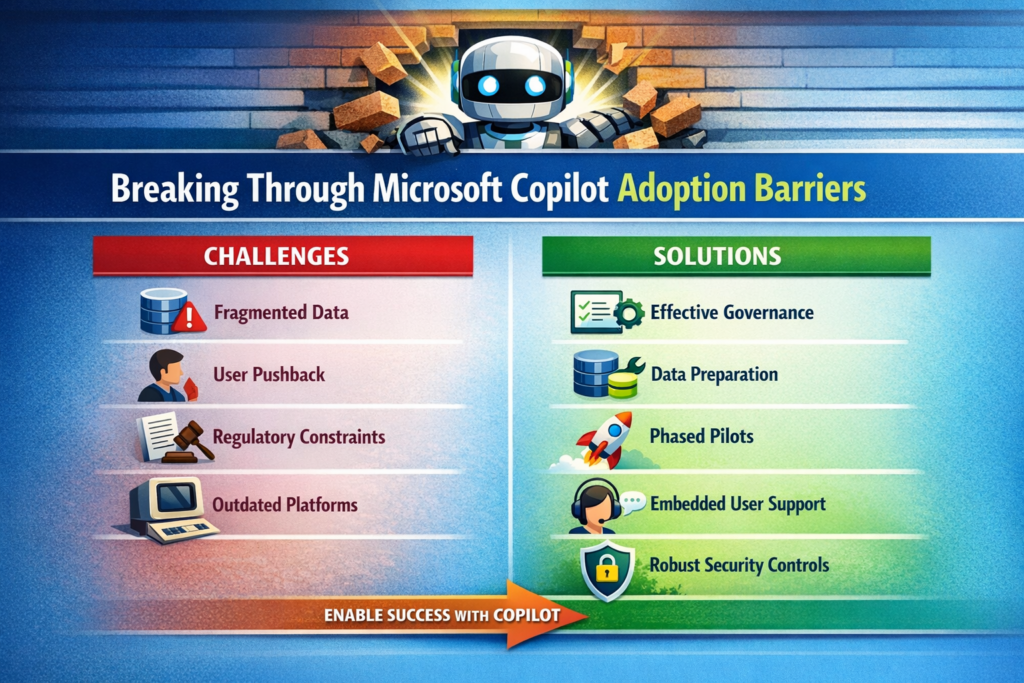
1. Data Hygiene and Permissions — The AI’s Diet

Copilot’s intelligence is only as good as the data you feed it. Disorganized SharePoint sites, inconsistent metadata and misaligned permissions will produce mediocre results and can expose sensitive information. Before rolling anything out, audit your content repositories and your Microsoft Entra ID configuration. If you still have an army of shared mailboxes or mysterious “Everyone” groups, fix those first.

Trade‑off: Cleaning up data and permissions isn’t glamorous or quick. It competes with feature development and sometimes uncovers political landmines. But skipping it means your AI assistant will look incompetent. You wouldn’t let a developer ship code before setting up version control; don’t expect an AI to deliver value without proper data plumbing.

2. Organizational Resistance — Not Everyone Loves Change

Users already suffer from change fatigue. Another tool promising to “transform productivity” can invite eye rolls. Leaders may also fear the unknown implications of AI on privacy and compliance. Communicate realistic benefits, involve legal and risk teams early, and tailor use cases to each department’s pain points. Don’t leave adoption to chance; treat it like any other major software rollout with change management built in.

Trade‑off: Over‑communicating can slow momentum, but silence breeds mistrust. Strike a balance by sharing concrete use cases—”we’re automating monthly financial summaries”—instead of vague promises.

3. Fragmented Systems — The API Problem

Copilot relies on Microsoft Graph connectors to pull data from third‑party platforms and on‑premises systems. If your CRM, HR and support systems aren’t connected, Copilot sees nothing. Technical teams need to establish integrations, configure Graph connectors and ensure indexing performance. Otherwise, the AI will provide incomplete answers or stall while waiting for data.

Trade‑off: Integration efforts take time and can reveal messy legacy dependencies. Resist the temptation to “pilot only in the Microsoft world.” Your users don’t live in one tool either; your AI shouldn’t.

4. Process and Governance Gaps — Who Owns This Thing?

Rolling out Copilot without defined ownership results in pockets of adoption and inconsistent configurations. Traditional one‑time training sessions don’t stick. Without continuous support, users revert to old habits. You need a central task force and an ongoing governance framework that includes IT, compliance, HR and business units. Set policies for role‑based access, monitor for AI misuse and create escalation paths.

Trade‑off: Governance can become bureaucratic if left unchecked. Keep it lightweight and pragmatic—focus on guardrails, not endless committees.
A Pragmatic Framework That Works

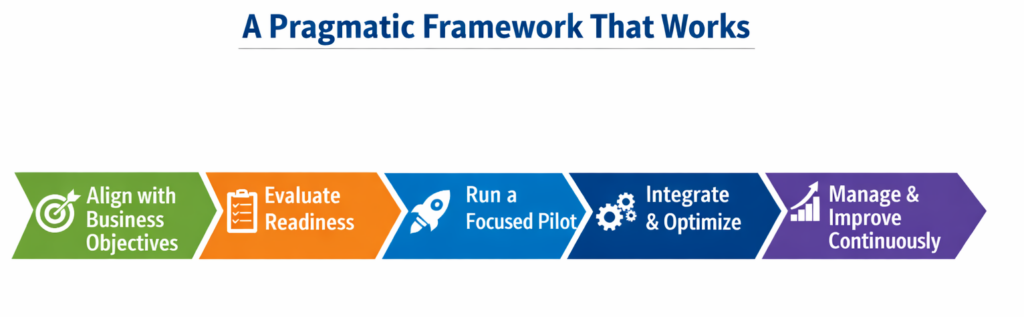
Step 1 — Align With Real Business Goals

Identify clear workflows where Copilot can generate measurable improvements: automating quarterly finance reports, drafting standardized contract clauses or summarizing customer support calls. Establish success metrics before rollout—reduced cycle times, fewer manual errors or higher employee satisfaction. Tie adoption to existing digital transformation initiatives rather than treating it as a side project.

Step 2 — Assess Enterprise Readiness

Run a technical audit of your Microsoft 365 tenant: content organization, permission hygiene, and Graph connector configuration. Parallel this with an organizational readiness assessment to gauge AI literacy and identify champions who will lead by example. If your environment isn’t ready, delay the rollout rather than risk a poor first impression.

Step 3 — Pilot, Don’t Boil the Ocean

Select pilot groups with well‑defined processes and clean data. Collect detailed feedback on user experience and productivity impacts. Use these insights to refine training materials and technical configurations. A phased rollout based on pilot results reduces risk and builds momentum.

Step 4 — Integrate and Optimize

Set up Graph connectors to integrate external systems like Salesforce or ServiceNow. Optimize indexing, search relevance and latency by monitoring Graph telemetry and tuning performance. Don’t treat performance tuning as an afterthought; delays and irrelevant results erode user trust faster than any licensing cost.

Step 5 — Invest in Continuous Change Management

One‑and‑done training doesn’t work. Provide in‑app, contextual guidance so users learn while they work. Build a champion network to share best practices and offer peer support. HR and training teams should create role‑specific AI literacy programs that address fears about job security and show how Copilot augments rather than replaces their work.

Step 6 — Measure and Iterate

Define key performance indicators beyond license activation: track actual usage, time saved on tasks, and user satisfaction. Establish a baseline before adoption, then compare post‑rollout metrics to quantify improvements. Use analytics to find underutilized features and adjust training or workflows accordingly. Continuous measurement and feedback loops turn adoption into an evolving practice rather than a one‑time event.

What I’ve Learned From the Trenches

  • Data quality is non‑negotiable. You can’t “train the AI harder” to fix poor metadata or broken permission models. Invest early in cleaning up your SharePoint and Teams structures.
  • Licensing is an operational, not just financial decision. Copilot is an add‑on to Microsoft 365 E3/E5. Start with pilot groups and plan for scaling costs, including support and training.
  • Don’t underestimate performance tuning. Large tenants with millions of documents will encounter search latency and ranking issues. Monitoring Graph telemetry should be part of your daily operations.
  • AI adoption is a cultural change. IT can configure connectors and licenses, but without HR and change management leading the human side, adoption stalls.
  • Governance isn’t glamorous, but it’s essential. Set clear policies for AI usage, auditing and risk management early. It will keep regulators happy and executives calm when the first misuse incident occurs.

Recommendations

  • Appoint a cross‑functional adoption task force. Bring together IT, compliance, HR and business unit leaders to coordinate strategy and maintain accountability.
  • Prioritize high‑value use cases for pilots. Start where data is clean and business impact is obvious. Expand only after demonstrating clear wins.
  • Leverage in‑app training tools and champion networks. Continuous guidance and peer advocacy accelerate adoption more than any slide deck.
  • Treat performance metrics as first‑class citizens. Use telemetry from the Microsoft 365 Admin Center and Graph usage dashboards to monitor adoption and refine configurations.
  • Plan licensing and support budgets holistically. Factor in the cost of training, change management and security monitoring alongside per‑user license fees.

Closing Takeaway

Rolling out Microsoft Copilot isn’t about pressing a button; it’s about engineering your environment—both technical and human—to harness AI effectively. Adopted thoughtfully, Copilot can free your teams from drudgery, accelerate decision‑making and spark innovation. Neglected, it becomes another underused line item on your cloud bill. Don’t settle for another half‑baked rollout. Address data readiness, design a measured adoption plan, and invest in continuous enablement. That’s how you turn generative AI from marketing hype into sustained productivity gains.

Thank you for stopping by. ✌️
Microsoft 365 Admins: June 2025 Brings Major Updates, Retirements & Action Items — Here’s Your Definitive Guide

Buckle up, admins! June’s heating up with a fresh wave of Microsoft 365 changes. Whether you manage identity, information protection, collaboration, or compliance, there’s something here that will nudge your daily workflow—or bulldoze it if you’re not paying attention.

Let’s cut through the clutter. Below is your clear, actionable roundup of what’s coming, what’s going, and what needs your immediate attention across the Microsoft 365 landscape.

In the Spotlight

Smoother OneDrive File Transfers

Say goodbye to clunky cleanup processes when employees leave. Microsoft’s new “Move and keep sharing” feature lets you transfer ownership while preserving existing sharing permissions. Combine that with new filters to zero in on important files and clearer notification emails, and you’ve got an admin’s dream come true.

Shared Mailboxes in New Outlook (Finally!)

The New Outlook for Windows now lets you add shared mailboxes like real accounts—no more backflips to get the same experience your users are used to. Easier management, better UX, happier end users.

Non-Profit Grant Offers Retiring

Heads up for non-profit orgs: Microsoft is retiring Microsoft 365 Business Premium and Office 365 E1 grant offers. If your licensing strategy includes these grants, now’s the time to rethink and re-budget.

June at a Glance

CategoryCount
Retirements4
New Features10
Enhancements9
Changes in Functionality5
Action Needed2

Retirements: What’s Going Away

  1. Meeting Details in OneNote for Windows 10 – Poof, gone starting June 2025.
  2. Private Content Mode in Viva Engage – Say farewell by June 30, 2025.
  3. Teams Recording Initiator Policy – Both the MeetingInitiator value and MeetingRecordingOwnership setting will be retired by June 30, 2025.
  4. Sports Calendars in Outlook – “Interesting Calendars” will vanish starting early June 2025.

New Features: What You’ll Want to Try First

  • Copilot Troubleshooter in Power Automate – Diagnose and resolve flow errors with a few clicks inside the designer.
  • Copilot for Security in Purview Insider Risk Management – Contextual alerts and smarter investigations—yes, please.
  • Data-at-Rest Scanning in SharePoint/OneDrive – Finally scan previously untouched files for sensitive info and apply sensitivity labels.
  • Microsoft Backup Enhancements – Define backup policies that automatically cover all Exchange, OneDrive, and SharePoint users—even new ones.
  • Automated Retention Actions in Gov Cloud – US government tenants can now use Power Automate to act on expired items.
  • 50+ Modern SharePoint Page Templates – No more pixel-pushing—get sleek, branded designs in a click.
  • New Insider Risk Email Indicators – Spot emails with attachments sent to free public domains or to oneself—cue the red flags.
  • Risky AI Activity Detection – Admins can now monitor for sensitive prompt usage and sketchy AI behavior.
  • Microsoft Defender XDR Integration – Insider Risk data will now flow into XDR for unified investigations.
  • Fabric Network Enhancements (Preview) – Private links and outbound access controls to lock down Fabric workspaces like Fort Knox.

Enhancements: Refinements You’ll Appreciate

  • HR Connector in Insider Risk Management – Apply the updated PowerShell script or risk issues.
  • Exclude Folders from OneDrive Sync – Control bloat and protect endpoints.
  • Reduce Noise in Communication Compliance – Filter out newsletters and spam to surface real threats.
  • On-Demand Classification – Retroactively classify sensitive content in SharePoint/OneDrive.
  • New Teams Role: Teams Reader – View-only access in the admin center. Great for auditors or curious execs.
  • View and Upload Anyone Links – Strike a balance between accessibility and control.
  • Global Exclusions in Insider Risk – Now supports more logical rules to cut alert fatigue.
  • DLP + Administrative Units – SharePoint DLP policies can now be scoped by administrative units. Finally.
  • Targeted IRM Policies – Use combinations of users, groups, and adaptive scopes for laser-focused risk management.

Functional Changes: What’s Evolving

  • SharePoint Online CDN Migration – Allow public-cdn.sharepointonline.com and stop relying on hardcoded links.
  • Teams DLP Reports – Incident notifications now come from both old and new sender addresses.
  • Exchange Federation Cmdlet ChangesGet-FederationInformation is being scoped down.
  • Audit Log Cmdlets Go Read-Only – No changes/downloads after June for Search-MailboxAuditLog and New-MailboxAuditLogSearch.
  • Separate Policy Tip Settings – Customize email notifications separately for SharePoint and OneDrive DLP.

Action Needed: Do This Now

  1. Viva Engage External Networks – Legacy networks will be retired June 1, 2025. Transition to modern external networks now to avoid disruption.
  2. Microsoft Defender SIEM Agents – After June 19, 2025, no new agents can be configured. Move to supported APIs to future-proof your integration.

Final Thoughts

If you’re managing Microsoft 365 in an enterprise setting, June is a no-joke month for updates. With new features that improve automation, security, and governance—and retirements that could leave gaps if ignored—it’s vital to stay proactive.

Bookmark this post, forward it to your team, and prep your change calendar. Because in IT, those who fail to plan… usually end up on a 2 a.m. call with their CISO.

Stay sharp, stay current—and keep your tenant tight.

Thank you for stopping by. ✌️

How SharePoint Advanced Management Prepares Your Organization for Microsoft Copilot

Introduction

Microsoft Copilot is revolutionizing the way organizations interact with data, leveraging AI to deliver intelligent insights and automation. However, for Copilot to function effectively, it requires a well-structured and secure data environment. SharePoint Advanced Management (SAM) provides essential tools to optimize, secure, and manage SharePoint content, ensuring your organization is Copilot-ready.

This post explores how SAM enhances permissions management, content governance, data accuracy, privacy, and security to maximize the benefits of Microsoft Copilot.

Accidental Oversharing – Taming the Wild West of Permissions

One of the biggest risks in any SharePoint environment is accidental oversharing of sensitive information. SAM helps organizations identify and remediate these risks through features such as:

  • Access Reviews: Automated reports highlight excessive or outdated permissions, enabling administrators to take corrective action.
  • Sharing Controls: Policies can be enforced to restrict sharing of certain file types or limit external sharing.
  • Auditing and Reporting: Advanced logging provides visibility into sharing activities, ensuring compliance with security policies.

By leveraging these tools, organizations can mitigate security risks, ensuring that only the right users have access to the right content, an essential step before enabling Copilot.

Minimize Your Content Governance Footprint – Streamlining for Efficiency

Microsoft Copilot’s efficiency is directly tied to the quality and relevance of the data it processes. Organizations with cluttered SharePoint environments may experience degraded performance and unnecessary costs. SAM offers capabilities to reduce redundant, obsolete, and trivial (ROT) content through:

  • Data Lifecycle Management: Policies that automate archiving or deletion of outdated content.
  • Content Insights: Identifies and flags low-value content, enabling administrators to focus on high-priority data.
  • Retention Labels: Ensures only necessary content is retained, reducing Copilot’s processing burden.

A leaner, well-structured SharePoint environment not only improves Copilot’s efficiency but also enhances its ability to provide accurate and relevant responses.

Improve Copilot Response Quality – Feeding Copilot the Right Data

Copilot’s output quality depends on the integrity of the data it analyzes. SAM helps improve content relevance and accuracy through:

  • Metadata Enrichment: Standardizes data classification, making it easier for Copilot to extract meaningful insights.
  • Duplicate Content Detection: Reduces information overload by identifying and consolidating redundant documents.
  • Content Curation Tools: Helps teams maintain well-organized libraries, ensuring Copilot pulls from authoritative and up-to-date sources.

By cleaning up SharePoint content, organizations can ensure Copilot provides more precise, actionable responses to users.

Control Content Access by Copilot – Ensuring Data Privacy and Compliance

As organizations integrate Copilot into their workflows, maintaining control over which content Copilot can access is crucial for privacy and regulatory compliance. SAM provides several features to manage Copilot’s data access:

  • Sensitivity Labels: Prevents Copilot from analyzing or referencing classified documents.
  • Conditional Access Policies: Restricts Copilot’s access based on location, device, or role.
  • Permissions Management: Ensures that Copilot can only interact with approved datasets, reducing the risk of data leakage.

These tools help organizations align Copilot usage with internal and external compliance requirements, protecting sensitive business information.

Ensure Data Safety for Business-Critical Sites – Protecting Your Crown Jewels

Certain SharePoint sites contain mission-critical data that require enhanced security and governance. SAM enables organizations to fortify these high-value sites by:

  • Access Reviews for Critical Sites: Periodically verifies that only authorized users retain access.
  • Advanced Threat Protection: Detects and prevents unauthorized access attempts.
  • Lifecycle Management: Ensures outdated or irrelevant data is systematically archived or deleted.

By implementing these controls, organizations can protect their most valuable digital assets while maintaining Copilot readiness.

Conclusion

Preparing for Microsoft Copilot requires more than just enabling AI-powered tools, it demands a well-governed, secure, and optimized SharePoint environment. SharePoint Advanced Management provides the essential capabilities to streamline content, secure sensitive data, and enhance permissions management, ensuring Copilot delivers accurate and efficient insights. By leveraging SAM, organizations can maximize the value of Copilot while maintaining security and compliance.

Start preparing your SharePoint environment today to unlock the full potential of Microsoft Copilot!

Thanks for stopping by. ✌